
Agoda: Cheap Flights & Hotels
agoda.comTravel & Local
4.613.06K Reviews
- Version
- 14.41.0
- Installs
- 100.00M
- Age Rating
- Everyone
Screenshots




Our Review of Agoda: Cheap Flights & Hotels
 Analysis by Appyee
When I’m choosing a travel app, a tempting price is only part of the decision. I also want to know what I’m booking, how much control I have over the search, and whether I can compare options without feeling rushed. Agoda: Cheap Flights & Hotels brings accommodation and flight searches together, which can be useful when I’m still shaping a trip rather than ready to book a single, fixed itinerary.
A familiar name, with a practical role
Agoda is a free travel app from agoda.com, and its place in the travel-and-local category is easy to understand: it helps people look for places to stay and flights. It has been available since July 6, 2011, and its 4.6 average from around 2.3 million ratings suggests that many travelers find it useful. That popularity is reassuring as a sign of broad use, but I wouldn’t treat a rating as a guarantee that every listing, fare, or booking will suit me.
For me, the best way to use a booking app is as a comparison and planning tool, not as a reason to stop checking the details. I look at the exact property or flight terms before committing, and I consider whether the location and schedule work for the trip I actually have in mind. Agoda has more than 100 million installs, is rated for everyone, and the current version is 14.19.0, with Android 8.1 as its minimum operating system. Those facts help place the app, but the useful question is whether its search and booking approach fits your travel habits.
Keep the booking decision in your hands
When I browse accommodation, filters and a map can help me narrow the field without relying on a headline price alone. I pay attention to where a property sits in relation to the places I plan to visit, then compare the room details and amenities that matter for my stay. A lower nightly rate may be less attractive if the location makes the trip inconvenient, so I treat the map as part of the decision rather than a decorative extra.
Reviews can add helpful context, especially when I’m weighing two similar-looking places. I read them for recurring, specific details that affect my needs instead of letting one glowing or unhappy comment decide everything. The app’s presentation of traveler feedback is useful, but I still check whether the review speaks to the kind of stay I’m planning: a quick overnight stop, a family visit, or a longer stay where practical details matter more.
Flight filters serve a different purpose. Narrowing choices by airline, layovers, or time of day can make the results more relevant, but I’d still compare the full itinerary and schedule before booking. A fare that looks appealing at first can be a poor fit if the timing or connection pattern does not work for me. When I’m flexible about dates or departure times, I can use the search to explore possibilities; when I have a fixed arrival deadline, convenience matters at least as much as price.
Handle personal details with care
Travel searches can become more personal as soon as I move from browsing toward a reservation: I may be entering traveler details, dates, and preferences. I take a moment to review what I’m submitting and check the booking information on screen before I confirm. That habit is worthwhile in any booking app, because a small mistake in a name, date, or destination can create avoidable stress later.
I also prefer to make choices deliberately rather than assume that a convenient app takes care of every decision for me. I check the options shown during the process, read the terms attached to the specific booking, and keep track of any confirmation details that appear. Agoda gives me a single place to search across travel needs, but I remain responsible for deciding whether a particular result and its conditions are right for me.
Who will get the most from it?
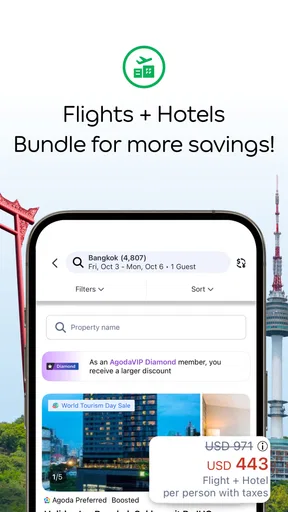
I can see Agoda working well for someone comparing stays in an unfamiliar destination, especially when location, room features, and guest feedback all matter. It may also suit a traveler who wants flight and accommodation searches in the same app while planning a trip. The combination is handy when I’m deciding between a central hotel and a less central option, or when I’m checking whether different flight times leave enough room for the rest of the itinerary.
It is less compelling if you already have a preferred airline or hotel and mainly want to book directly with that provider. In that case, the provider’s own app may be the simpler place to manage a booking or review its specific rules. Likewise, if you want to compare every possible travel site side by side, Agoda should be one stop in your research rather than the only one. I’d use it to discover and assess options, then make the final choice based on the details that matter to my trip.
First Impressions and User Interface
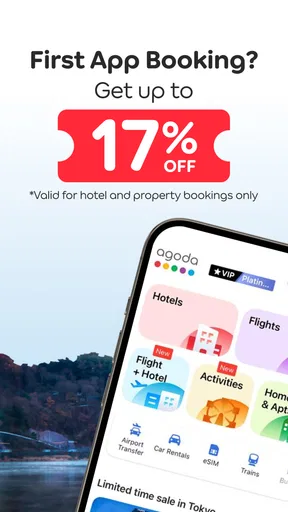
From the moment you open the app, it’s clear that Agoda means business. The interface is sleek and user-friendly, making navigation a breeze. You’re greeted with a simple search bar where you can enter your destination, dates, and preferences. What I love is how intuitive it feels – you don’t need to be a tech wizard to figure it out.
The color scheme is easy on the eyes, with a combination of whites and blues that make browsing a pleasant experience. The app doesn’t bombard you with ads, which is a huge plus in my book. Everything is neatly organized, with tabs for hotels, flights, and even vacation rentals.
Booking Hotels
Booking a hotel is as easy as pie. Once you enter your destination and dates, Agoda provides you with a list of options. You can filter these by price, star rating, guest rating, and more. What’s cool is the map view, which lets you see exactly where each hotel is located. This is super handy if you’re trying to stay close to certain attractions.
The app also features honest reviews from other travelers. These reviews are gold, giving you a heads up on what to expect. Plus, you can see all the amenities listed clearly – from WiFi to swimming pools, it’s all there.
Finding Cheap Flights
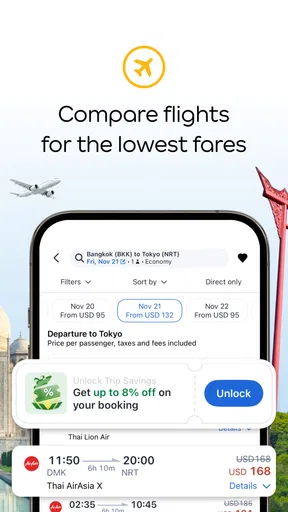
Flights can be a major pain to book, but Agoda makes it relatively stress-free. The app compares prices from different airlines and presents you with the best deals. I was pleasantly surprised by how competitive some of the prices were. You can filter flights by layovers, airlines, and even time of day, making it easier to find what suits your schedule and budget.
What’s more, the app offers a price alert feature. This is fantastic for those of us who love a good bargain. Just set an alert for your desired route, and you’ll get notifications when prices drop.
Extras and Unique Features
Agoda isn’t just about flights and hotels. They’ve got vacation rentals covered too, which gives you even more options for accommodation. Whether you’re looking for a cozy apartment or a luxurious villa, there are plenty of choices.
Another neat feature is the app’s integration with exclusive deals and discounts. As you browse, you might stumble upon “Secret Deals” that offer even more savings. It feels a bit like finding a hidden treasure, and who doesn’t love that?
They also have a loyalty program called AgodaVIP. Frequent users can earn points and receive additional discounts, which is a sweet perk if you’re a regular traveler.
Choosing it for an actual trip
One realistic use is a weekend away where I know the destination but haven’t settled on the neighborhood. I can search dates, scan the map for a workable base, and compare guest comments with the amenities I’ll actually use. I’d shortlist a few places before checking their details carefully, rather than booking the first result that looks inexpensive. That extra comparison can reveal whether a central location is worth more to me than a larger room farther out.
For a work trip, I’d start with the schedule rather than the cheapest flight. I can filter by departure time and layovers, then check whether the itinerary leaves enough margin for the meeting or onward travel. A price alert is more useful when I have some flexibility and can act if a fare changes; it is less useful when I must travel on a particular flight regardless. I would not treat an alert as a promise that a lower price will appear.
Small habits that improve the search
When I’m comparing places, I try changing one filter at a time. If I adjust price, location, and guest rating all at once, I can lose track of why a promising option disappeared. I also use the map early enough to rule out inconvenient areas, then return to the listing details for the finalists. This keeps the search focused on the stay I want instead of turning it into an endless scroll through superficially similar rooms.
For flights, I compare the total shape of the journey, not just the displayed fare: departure and arrival times, the number of stops, and whether the schedule fits the rest of my plans. If I’m open to several options, I’ll search before I’m under pressure to buy. If my dates are fixed, I’ll prioritize a workable itinerary and avoid letting a deal label distract me from a connection or arrival time that causes trouble.
Agoda’s mix of hotels, vacation rentals, and flights is convenient, but it does not remove the value of checking another source. I may compare a shortlist with a provider’s own booking channel or another travel service, particularly when I already know which property or airline I want. That is not a reason to dismiss Agoda; it is a sensible way to understand the alternatives and choose the arrangement that fits best.
When convenience has limits
A broad search app is less helpful when my needs are unusually specific or when I want to deal directly with a particular provider. Search results can only help if I inspect the details that define a good fit: the room configuration, location, timing, and the conditions attached to the option I’m considering. I don’t assume that a low price means the same thing across different listings, so I compare like with like before deciding.
There is also a trade-off in having several kinds of travel search in one place. It is easy to move between flights and places to stay, but that convenience can encourage me to make decisions too quickly or treat a whole trip as one simple purchase. I prefer to settle each part on its own merits and confirm that the dates line up. Travelers who want a highly specialized tool for one airline, chain, or itinerary may find a dedicated provider app more direct.
What I check before confirming
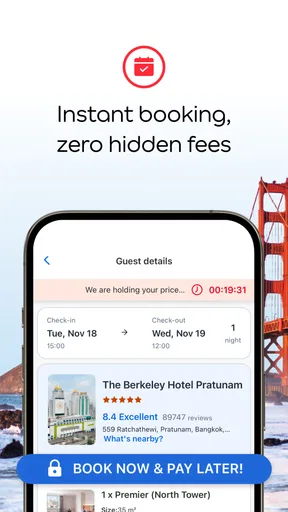
Before I complete a booking, I review the destination, dates, traveler details, and the terms shown for that exact option. For a stay, I check the property information and amenities against my priorities; for a flight, I confirm the itinerary and timing. If anything is unclear on the screen, I pause rather than assume. This is a simple routine, but it helps avoid choosing a result based on a thumbnail, a short description, or a price alone.
After booking, I keep the confirmation information somewhere I can find it and make sure the details match my plans. If I’m coordinating with other travelers, I share the relevant schedule and accommodation information directly with them instead of relying on everyone to interpret the same search result. The app can make discovery easier, but careful checking remains part of booking well.
A measured recommendation
My overall impression is that Agoda is a useful option for travelers who want to compare accommodation and flights without starting in separate apps. The map, filters, traveler reviews, and price alerts can support a more considered search, while rentals give accommodation hunters another kind of stay to examine. The app is free, and its broad audience suggests it has become a familiar booking choice, but popularity alone would not make me skip the fine print or stop comparing.
I’d recommend trying it if you are flexible enough to compare options and willing to inspect the booking details before you commit. I would choose a provider’s own app when I already know exactly where I want to book or need a direct relationship with that provider. Used thoughtfully, Agoda can help me build a shortlist and spot possibilities; the final decision still belongs to me, and that is exactly how I prefer to travel.
Final Thoughts
Overall, my experience with Agoda: Cheap Flights & Hotels has been pretty impressive. It’s a powerful tool in any traveler’s arsenal, offering convenience, great deals, and a user-friendly experience. While no app is perfect, Agoda comes pretty close by providing a comprehensive service for travelers looking to save both time and money.
If you haven’t tried it yet, I’d say give it a whirl. You might just find your next great travel deal here. Happy travels, everyone!
Privacy and Permissions
See what permissions an app requests and how it handles your data.
- Calendar
- read calendar events plus confidential information
- Location
- approximate location (network-based), precise location (GPS and network-based)
- Photos/Media/Files
- read the contents of your USB storage, modify or delete the contents of your USB storage
- Storage
- read the contents of your USB storage, modify or delete the contents of your USB storage
- Camera
- take pictures and videos
- Microphone
- record audio
- Wi-Fi connection information
- view Wi-Fi connections
- Other
- view network connections, full network access, change your audio settings, reorder running apps, prevent device from sleeping, read Google service configuration
Verdict
Strengths of Agoda: Cheap Flights & Hotels
- User-friendly interface for easy navigation.
- Comprehensive search filters for tailored results.
- Competitive pricing with exclusive deals.,24/7 customer support for assistance.
- Wide selection of accommodations worldwide.
Limitations of Agoda: Cheap Flights & Hotels
- Occasional app crashes can disrupt usage.
- Limited rewards program compared to rivals.
- Offline access to bookings is not available.
- Some features require a stable internet connection.
- In-app ads can be intrusive at times.
Similar Picks in This Category
View All
Google Maps
Google LLC3.4

Google Maps Go
Google LLC4.1

Booking.com: Hotels & Travel
Booking.com Hotels & Vacation Rentals4.8

Google Earth
Google LLC3.8

Skyscanner Flights Hotels Cars
Skyscanner Ltd4.8

trivago: Compare hotel prices
trivago N.V.4.4
Frequently Asked Questions
What features does Agoda: Cheap Flights & Hotels offer?
Agoda provides a comprehensive booking experience for both flights and hotels. Users can search for accommodations worldwide, compare prices, and access exclusive deals. The app also offers a user-friendly interface, filters for tailored searches, and options to save favorite hotels for future reference. Additionally, it includes customer reviews and ratings to help make informed decisions.
Is it safe to book through Agoda?
Yes, booking through Agoda is generally considered safe. The app uses secure payment systems to protect user information. Agoda is a well-established platform with millions of users and has partnerships with a wide range of hotels and airlines. However, it's always advisable to read reviews and verify details before finalizing any booking.
How can I find the best deals on Agoda?
To find the best deals, users can utilize Agoda's filters and sort options to compare prices across different hotels and flights. The app often offers flash deals and special discounts, which can be accessed by signing up for notifications. Additionally, booking in advance and being flexible with dates can help secure better prices.
Can I cancel or modify my bookings on Agoda?
Yes, Agoda allows users to cancel or modify their bookings, but policies vary depending on the hotel or airline's terms. It's crucial to check the cancellation policy before booking, as some deals might be non-refundable. The app provides a section to manage bookings, making it easy to make any necessary changes.
Does Agoda offer customer support?
Agoda offers robust customer support available 24/7 to assist users with any queries or issues. Support can be accessed directly through the app via chat or email, ensuring help is readily available. Additionally, there's an extensive FAQ section within the app to address common concerns and questions.
